A temp email can work for a short 3CX trial sign-up, but it becomes risky once extensions, call routing, shared admin access, or account recovery depend on that inbox.
Use a disposable address for quick evaluation only, then switch to a stable mailbox before you attach real numbers, teammates, or production phone workflows.
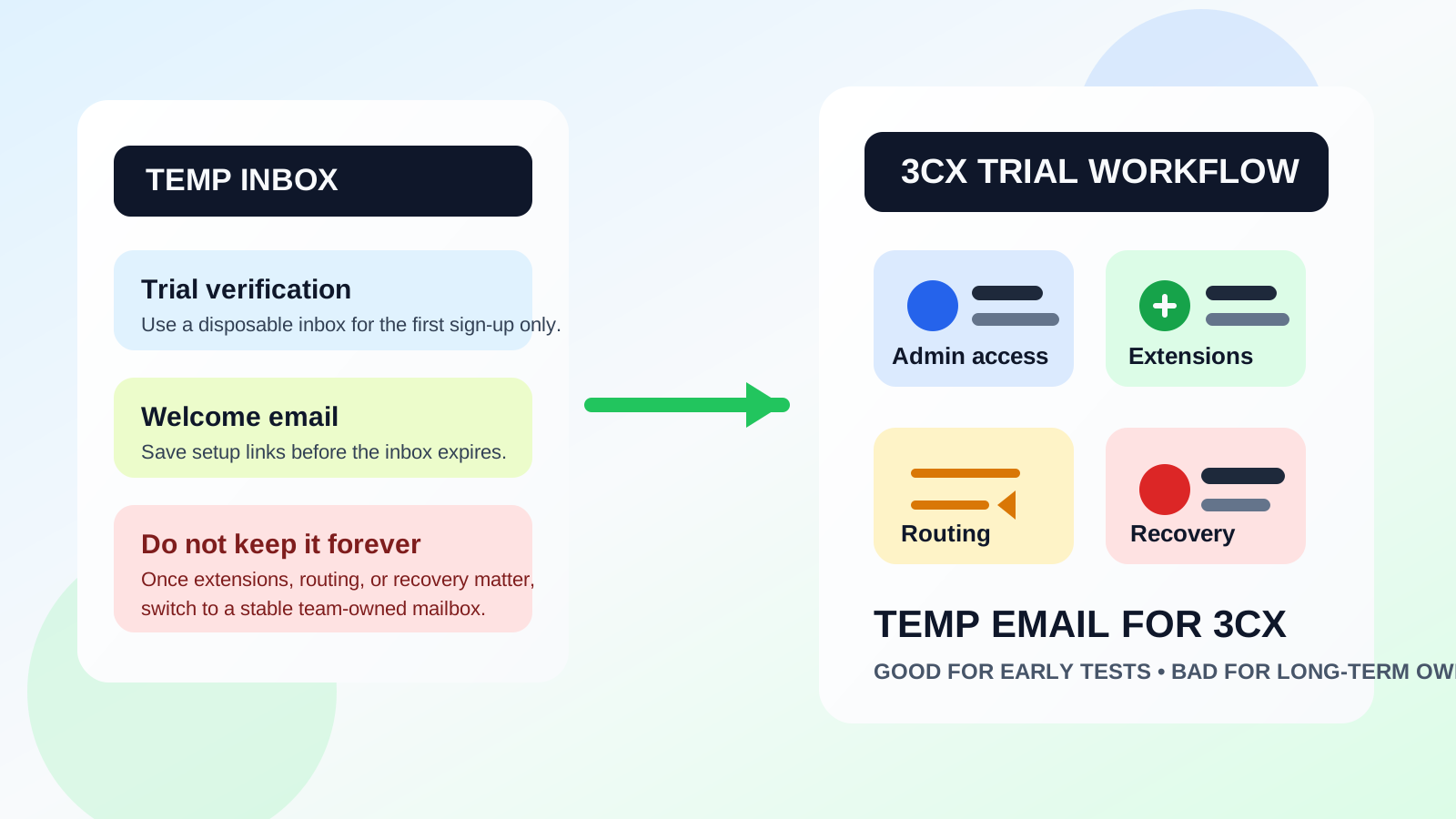
If you want to test 3CX without feeding your main inbox into a long vendor follow-up sequence, a temporary inbox can be useful at the start. Many business phone and contact-center tools ask for an email before they unlock a free trial, onboarding checklist, or first admin dashboard. That does not automatically make a disposable address the wrong choice. It just means you should be clear about what stage you are in.
For a quick look at the product, a temporary inbox can keep your primary email cleaner and make early comparisons less annoying. But 3CX is not a one-person newsletter subscription or a throwaway consumer app. It touches calling, extensions, admin access, voicemail settings, routing rules, and eventually business continuity. Once the account starts behaving like a real phone system, the inbox behind it matters.
When a temp email makes sense for 3CX
The best use case is a narrow one: you want to see the product, confirm the signup, click through the first setup messages, and decide whether 3CX is worth deeper evaluation.
- Short product comparisons: you are looking at several business phone or PBX options and do not want every vendor sequence hitting your main inbox.
- Very early testing: you only need the verification email, welcome email, and a small amount of onboarding guidance.
- Privacy during research: you want to separate product research from your long-term work identity until the shortlist is clearer.
- One-person evaluation: no teammates, shared ownership, or production phone numbers are involved yet.
That is the cleanest temporary-email scenario. If you use an inbox from a tool like Anonibox for that first phase, the goal should be simple: confirm the trial, inspect the product, save anything you need, and decide quickly whether the tool deserves a real account owner.
Where a temp email starts to become a bad idea
The moment your 3CX setup becomes more than a personal trial, a disposable address starts creating risk.
Team access
If multiple people may administer the system, review settings, or take over later, the account should not live behind an inbox that might disappear. A stable mailbox gives the business a reliable place for login notices, policy updates, support replies, and ownership changes.
Call routing and production setup
Once you start building real call flows, assigning extensions, or configuring routing rules for customers or staff, the account stops being casual. At that point, losing access to an old verification or recovery email is no longer a small inconvenience. It can slow down troubleshooting when something important changes.
Billing and renewal notices
Even if the product begins as a free evaluation, serious adoption usually leads to renewal reminders, plan changes, or support emails that should reach a real owner. A disposable inbox is weak for anything tied to payment responsibility or long-term account control.
Recovery and security
This is the biggest reason to switch. If a password reset, security alert, or ownership confirmation goes to a temporary inbox that no longer exists, you can create a painful access problem for yourself or your team.
A safer workflow if you want privacy during evaluation
You do not need to choose between total exposure and total chaos. The practical middle ground is to use a temporary inbox only for the first layer of product research, then switch to a real mailbox before the account matters operationally.
1. Use the temp email for the first signup only
Create the disposable address before you register. Use it for the first verification message and the welcome sequence. If 3CX looks irrelevant after ten minutes, you have protected your main inbox without much downside.
2. Save the useful onboarding details immediately
Do not leave trial access hanging on a mailbox you may never see again. Save setup links, activation steps, or support references you actually need. If the inbox is temporary by design, act like it.
3. Decide quickly whether the tool is still in contention
After the first walkthrough, ask a simple question: is this still a serious option? If the answer is no, you are done. If the answer is yes, stop treating it like a throwaway test.
4. Move to a stable business-owned inbox early
Before you add real users, extensions, routing rules, or admin collaborators, change the account email to a mailbox your team controls long term. That could be a shared operations inbox, an IT-owned mailbox, or another stable address with clear ownership.
5. Document who owns the account
Do not let an important phone platform live inside one person’s half-forgotten trial workflow. Write down who controls the mailbox, who has admin rights, and where recovery notices should go.
What to evaluate during the 3CX trial instead of obsessing over the email itself
The point of a trial is not just to prove that a login works. It is to answer whether the platform fits your real communication workflow. Once the signup is complete, spend your time on the product questions that actually matter.
- Setup clarity: is the first-run experience easy to understand, or does it hide important configuration steps?
- User management: can you picture how new admins, teammates, or extensions would be added without confusion?
- Routing logic: does the call flow structure make sense for your business?
- Operational handoff: if someone leaves the team, would ownership and access be easy to transfer?
- Support workflow: are the notices, setup emails, and help paths organized enough for real use?
Those are the issues that matter far more than whether the first login came through a disposable inbox. A temp email can help you start privately, but it should not distort how you judge the platform.
Common mistakes to avoid
Keeping the disposable inbox attached for too long
This is the classic mistake. People start with a temp email for privacy, the trial keeps going, real settings get added, and nobody ever switches the account over. That is how a small convenience turns into an avoidable access headache.
Using the same temp inbox for multiple vendors
If you are evaluating several business phone or contact-center tools, one inbox per tool is cleaner than one inbox for everything. Mixing multiple trials into a single disposable mailbox makes it harder to track which verification message belongs to what.
Forgetting that business phone software is operational software
3CX is closer to infrastructure than entertainment. The more your phone setup affects customer calls, staff workflows, or recovery options, the less appropriate a throwaway inbox becomes.
Assuming privacy and permanence are the same thing
They are not. A temporary inbox is useful for privacy at the start. A stable mailbox is useful for continuity later. Good setup means using each tool at the right stage instead of expecting one approach to solve everything.
When you should switch from temp to real immediately
Do not wait if any of these are already true:
- You are inviting teammates or co-admins.
- You are configuring real numbers or production routing.
- You are relying on the system for customer or internal calls.
- You are entering billing details or preparing for a paid plan.
- You want dependable recovery and long-term ownership records.
At that point, the account should live behind a durable inbox with clear business ownership.
Final answer
Can you use a temp email for 3CX? Yes, for a short trial sign-up and early evaluation. Should you keep using it once the account becomes real? Usually no.
The smart approach is to use a disposable inbox only to protect your privacy during the first research step, then switch to a stable mailbox before team access, routing, billing, or recovery matter. That gives you the best of both worlds: less inbox clutter up front, and less account-risk later.