A temp email can be fine for a quick Ooma Office trial sign-up, but it becomes risky once your phone numbers, admin alerts, team users, or account recovery depend on that inbox.
Use a disposable address for the earliest evaluation steps only, then switch to a durable business inbox before you buy numbers, invite teammates, or rely on the account for real customer communication.
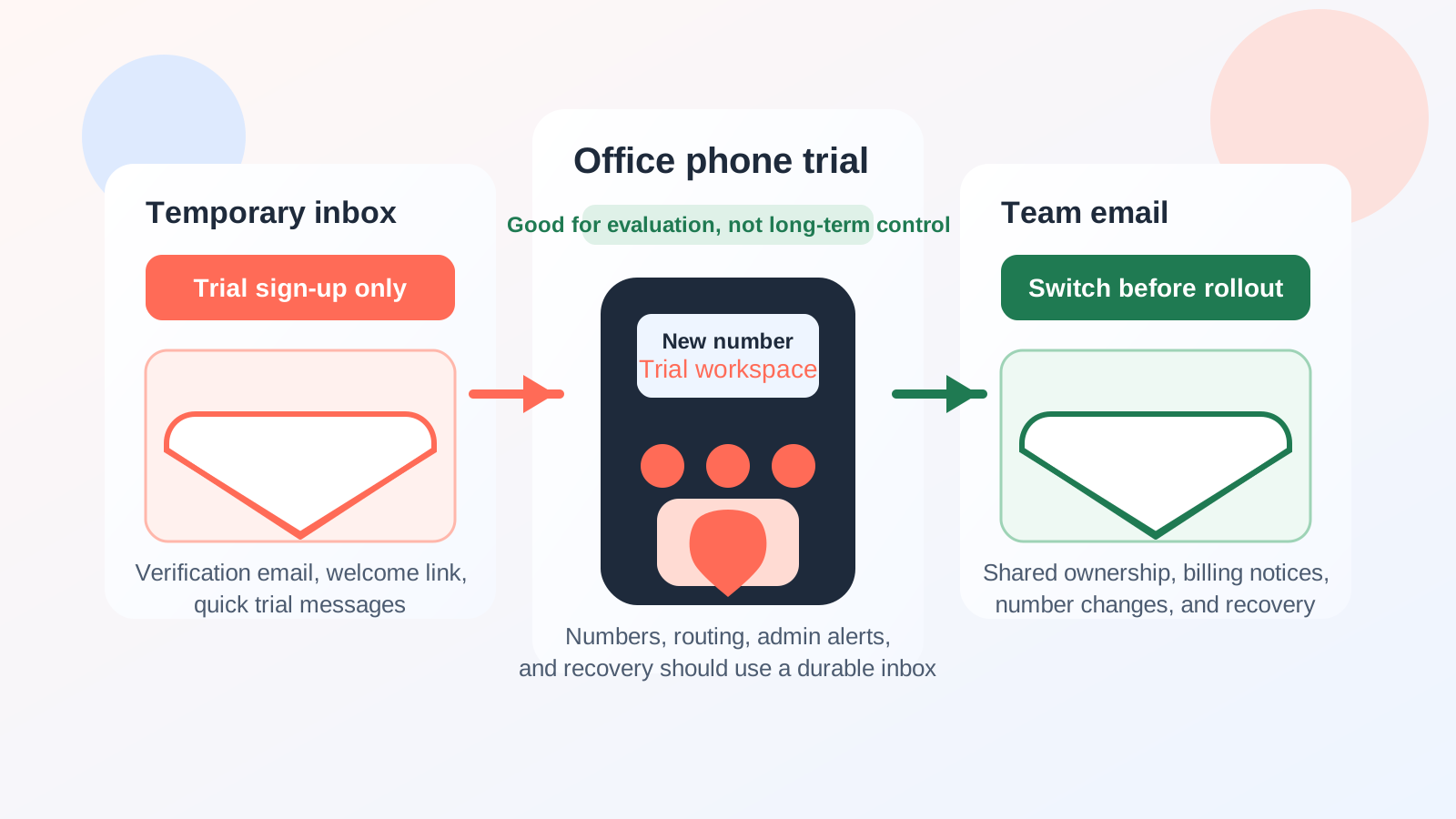
Short answer: yes for early evaluation, no for long-term ownership
If your goal is simply to see how Ooma Office looks, receive a verification message, review onboarding emails, or test the first few setup screens without adding more vendor mail to your primary inbox, a temporary address can be useful. It keeps early-stage trial noise separate from the email address your team actually depends on every day.
That said, a business phone system is not like signing up for a throwaway newsletter. Once a platform starts holding real phone numbers, user access, voicemail notifications, billing notices, or recovery steps, the inbox on file matters. A temporary address can help at the front door, but it is a bad foundation for long-term control.
When a temp email makes sense for Ooma Office
There are a few situations where using a temp email for Ooma Office is completely reasonable.
- Trial exploration: you want to see the admin dashboard, look at feature prompts, or compare the product with other business phone systems before committing.
- Vendor research: you are collecting demos, pricing follow-ups, or setup guides from multiple providers and want to avoid mixing all of that with your normal work inbox.
- One-person evaluation: you are the only person testing the tool, and you have not attached real team workflows yet.
- Shortlist filtering: you only want to give your real company address to the one or two platforms that survive initial comparison.
In those cases, a disposable inbox does what it should do: receive the confirmation email, let you look around, and prevent your permanent inbox from collecting months of follow-up mail from a tool you may never adopt.
Where a temporary inbox becomes risky
The moment the account starts to matter operationally, the email address on file stops being a minor detail. With a phone system, that can happen faster than people expect.
1. Phone numbers and account control
If you purchase, assign, or port numbers into the account, you do not want the main contact address to live in a mailbox that may expire or become unreachable. Number-related notices, ownership confirmations, and account changes should go somewhere stable that the right people can access later.
2. Team invites and shared administration
Business phone systems often stop being personal tools very quickly. One admin turns into several users, call routing changes, shared settings, and handoffs between operations, IT, and front-desk staff. A disposable inbox is not a strong anchor for a system other people may need to manage after the trial stage ends.
3. Voicemail, missed-call, and setup notifications
Even if your business does not fully roll out the platform right away, important account emails can still show up during testing. If the inbox expires, gets recycled, or simply falls out of sight, small issues become harder to spot. That can slow down evaluation and create confusion about what was actually configured.
4. Billing and renewal notices
Any service that moves from trial to payment should use a monitored address. You do not want invoices, card issues, feature-limit notices, or renewal prompts going to an inbox nobody checks anymore.
5. Recovery and security workflows
When you need to reset a password, verify an identity action, or confirm a change to the account, email is often part of the process. A temporary inbox is useful until recovery depends on it. After that, it becomes a liability.
A safer workflow if you want the privacy benefit without the long-term risk
You do not have to choose between total exposure and reckless throwaway use. The better approach is to treat temp email as a screening tool, not a permanent control point.
Step 1: Use the temporary inbox only for the first pass
Create the account with a disposable inbox if you are still deciding whether Ooma Office even belongs on your shortlist. Use it to receive the first verification email, quick-start notes, and early onboarding messages. If you use Anonibox or another temporary inbox for this stage, keep the goal narrow: validate the trial and gather enough information to judge the platform.
Step 2: Test the right things quickly
Do not spend all your time reading promotional messages. Focus on the real evaluation questions:
- How easy is the initial setup?
- Can you understand the admin layout without a lot of friction?
- Does the call-handling workflow fit a small team or front-desk use case?
- Are user roles, voicemail settings, and routing options practical for how your business actually works?
- Does the mobile or desktop experience seem realistic for daily use?
This is where a temporary inbox earns its keep. You can verify the account, review the basics, and compare tools without letting every vendor own a permanent place in your main inbox.
Step 3: Switch to a durable inbox before anything real starts
If Ooma Office remains a serious option, change the account email before you buy numbers, invite coworkers, connect serious workflows, or store anything your team would need later. Ideally, use a stable business address that the right people can monitor rather than a single employee’s personal mailbox.
Step 4: Save the important onboarding messages
Before you abandon the temporary inbox, save anything you may actually need: welcome details, setup instructions, or useful feature notes. That way you keep the useful information without keeping the disposable address attached longer than necessary.
Practical mistakes to avoid
- Do not leave the temporary inbox attached after buying or porting numbers.
- Do not invite teammates while the account still depends on an inbox nobody plans to keep.
- Do not assume you will remember to switch it later. Make the change as soon as the trial turns serious.
- Do not use a disposable address for anything you may need to recover weeks or months later.
- Do not confuse privacy during evaluation with privacy during production operations. They are different problems.
A quick decision checklist
Before using a temp email for Ooma Office, ask yourself:
- Am I only testing the platform, or am I about to rely on it?
- Will this account hold real business numbers or real customer communication?
- Will other teammates need access, continuity, or account recovery later?
- Do I want a disposable inbox for the first step only, followed by a stable team inbox?
If you are still in the comparison phase, a temporary address is usually fine. If you are moving toward ownership, billing, routing, or multi-user setup, it is time to switch.
Final takeaway
Using a temp email for Ooma Office is a practical way to keep early trial messages out of your main inbox, especially when you are comparing several business phone providers at once. It helps most during the very first stage: sign-up, verification, and quick feature evaluation.
But once the account starts holding real operational value, the disposable inbox should go. Numbers, teammate access, billing notices, and recovery workflows belong on a stable, monitored email address. Use temporary email to stay organized while you research, then move to durable contact details before the phone system becomes part of your real business stack.